I wanted a better way to follow baseball.
Not just a scoreboard. I wanted to open a site, see what was happening around the league, understand a pitching matchup, and figure out what made a game interesting without opening six different tabs. I also wanted to get deeper into advanced statistics without feeling like I needed a reference book next to every table.
That became Dugout Signal.
What started as a baseball website on a Debian VM in my homelab grew into a project that brought together product design, application development, data integration, authentication, and production infrastructure. Getting the page to load was the beginning. Making it useful, understandable, and recoverable took considerably more thought.
The idea: make the numbers mean something
There are already excellent sources of baseball information. I wasn’t trying to rebuild FanGraphs or compete with the depth of its database. I wanted to improve the experience of exploring that information as a fan.
I kept coming back to three priorities:
- Help a casual baseball watcher become more comfortable with advanced statistics.
- Make the site beautiful and easy to navigate.
- Add useful context that gives someone a reason to come back.
Those priorities became a filter for features. A table with more columns isn’t automatically more useful. A chart isn’t helpful just because it moves. The question was always: does this make it easier to understand the game?
Building the experience around how I watch baseball
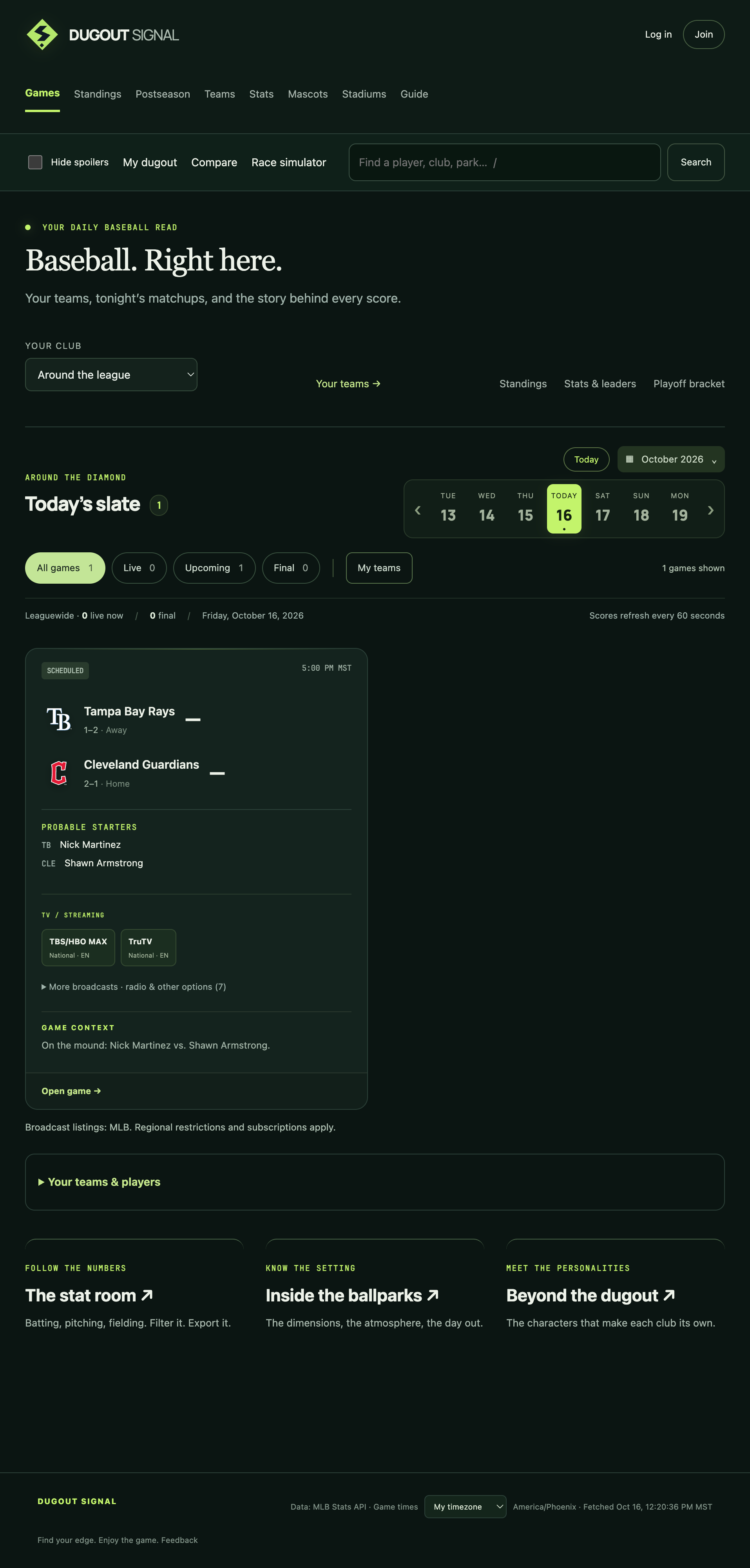
The application grew around a few connected journeys: checking today’s games, exploring a matchup, following a team, and learning about a player.
Game pages bring together scores, broadcast information, starting pitchers, lineups, and a scoring timeline. Matchup comparisons use horizontal bars to show which side leads in a particular statistic, with explanations available alongside the numbers. An advantage in a statistic is context, not a guarantee of who will win.
Team pages introduce the people worth paying attention to. Aces, Bats to know, and Arms to know are more approachable entry points than dropping someone straight into a long roster. Bullpen readiness adds recent workload context, while the full roster, schedule, and statistics remain available when someone wants more detail.
Player pages connect season and career statistics with recent performances, splits, and photos. For pitchers, the pitch repertoire is visible by default. Knowing what someone throws is basic context for watching them pitch; it shouldn’t be buried behind an obscure control.

The statistics page has preset leaderboards, essential and advanced views, sorting, and CSV/Excel exports. I also added a baseball guide so unfamiliar terminology has a home beyond a tooltip.
There is room for the lighter side of the sport, too. Ballpark and mascot pages make the site feel like baseball rather than a database front end. Personal follows, player comparisons, share cards, and team calendar feeds give people ways to use the information beyond a single visit.
Design was an ongoing part of development
The visual direction settled into a dark palette, restrained team colors, player photography, and JetBrains Mono in data-heavy areas. I like monospace typography, but using it selectively gives the numbers their own rhythm without making every paragraph look like a terminal.
A lot of the improvements came from using the site and noticing friction:
- Leaderboard presets initially updated a table too far down the page to see.
- Player names and club columns consumed space that the statistics needed.
- Preview buttons became visually louder than the names beside them.
- Mobile navigation needed a different treatment from desktop navigation.
- Nested cards made some pages feel cramped even when there was plenty of space.
Those were layout and hierarchy problems. Adding another feature wouldn’t fix them.
I also removed ideas that didn’t earn their space. A series simulator that merely demonstrated that adding a win changes the series result wasn’t offering enough insight. Neither was a large watch queue that displaced more useful information on the homepage.
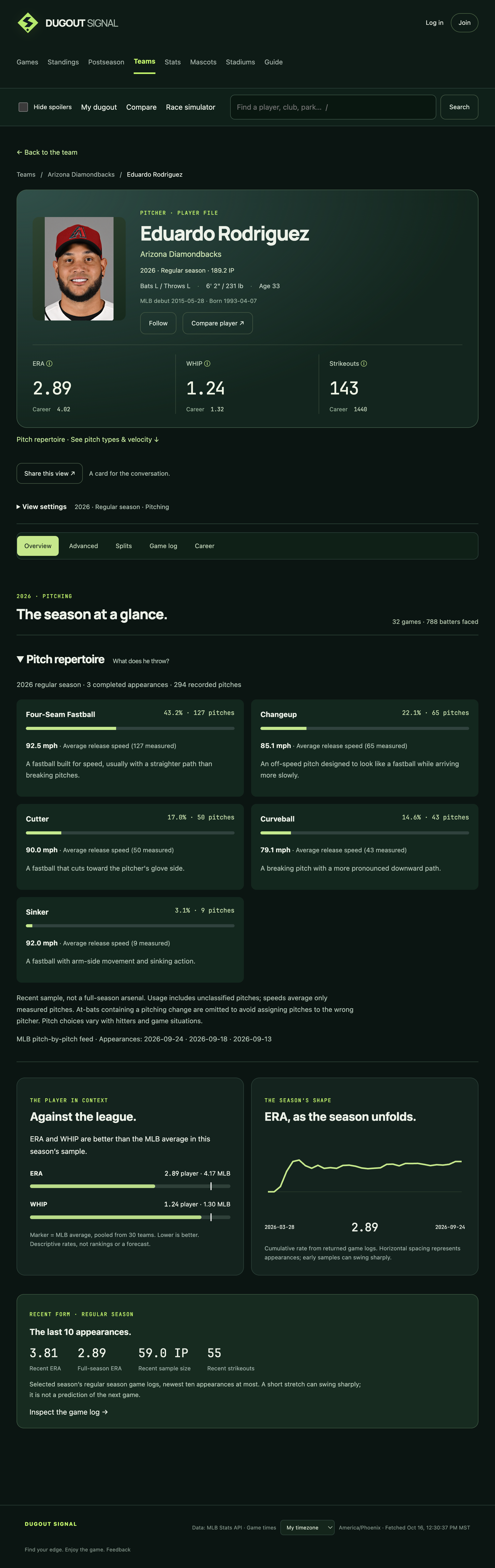
I used OpenAI Codex as a development partner throughout the project, helping with implementation, debugging, research, and deployment work. My role was setting the direction, testing the experience, challenging the results, and deciding what belonged in the product. That process involved a lot of screenshots and very specific feedback about what felt confusing, redundant, or visually wrong.
Making bullpen workload visible
Recent pitch counts and rest are easier to understand when they are shown together. The bullpen view places both teams side by side, with each pitcher’s recent workload visible without opening several player pages. These are workload estimates, not confirmation that a pitcher is available.
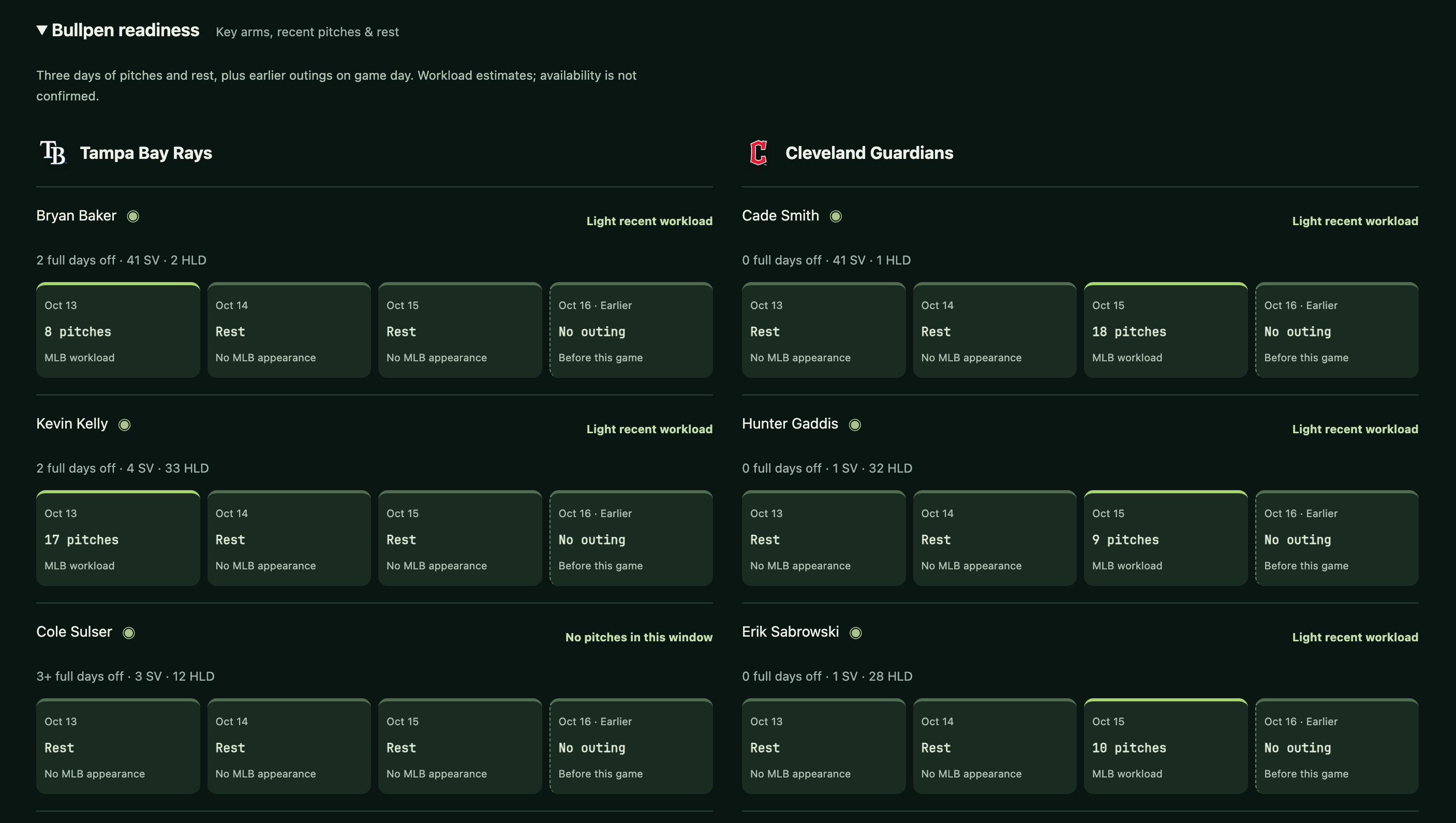
Recent pitches and rest at a glance. Open the image to inspect the details.
The application stack
I built Dugout Signal with Ruby on Rails and PostgreSQL, packaged with Docker Compose.
| Layer | Technology | Role |
|---|---|---|
| Application | Ruby 3.4 / Rails 8.1 | Pages, accounts, data integration, and application logic |
| Web server | Puma | Runs the Rails application |
| Database | PostgreSQL 17 | Durable application data and shared feed cache |
| Packaging | Docker Compose | Runs the application, database, and tunnel connector |
| Host | Debian 13 on IONOS | Production compute |
| Public access | Cloudflare Tunnel | Connects the public hostname to the application |
| Off-site backups | Backblaze B2 + age | Encrypted recovery bundles with retention protection |
| Proton SMTP | Operational alerts and daily backup summaries | |
| External checks | Better Stack | Public website and application-health monitoring |
A single application and database were enough for the current scope. I didn’t need to introduce a collection of separate services before there was evidence that the site needed them.
Getting the baseball data right
The current integration uses MLB’s Stats API for schedules, standings, rosters, statistics, game logs, and game events. Responses are cached in PostgreSQL so browsing the site doesn’t require fetching everything from upstream repeatedly.
That does not mean every statistic available elsewhere is automatically available here.
One example is pitch repertoire. The current view samples the selected pitcher’s latest three logged appearances, using completed games with available play data. It isn’t presented as a full-season pitch mix. That distinction matters: a useful small sample becomes misleading if its label implies something broader.
Missing data needs the same care. If a split isn’t supplied, filling the gap with zero would turn an unknown into a false fact. Season, competition, sample size, and coverage all affect what a number means.
Contract information became another useful boundary. I explored displaying salaries, options, arbitration, and extensions, but comprehensive sourced coverage was harder to obtain than ordinary game statistics. I decided to defer it rather than build a polished screen around incomplete information.
Publicly accessible data also isn’t the same thing as an unrestricted license. Publication rights, attribution, exports, and proprietary metrics need their own evaluation as the project expands.
From the homelab to a public service
The first version ran on a Debian VM inside Proxmox at home. That was a good place to build: inexpensive, familiar, and easy to change.
As the project became something I wanted other people to use, I moved production to a separate IONOS VPS with four vCPUs and 8 GB of RAM. The motivation was independence from my home server, power, and internet connection, rather than a claim that the application had already outgrown the hardware.
The public request path is straightforward:
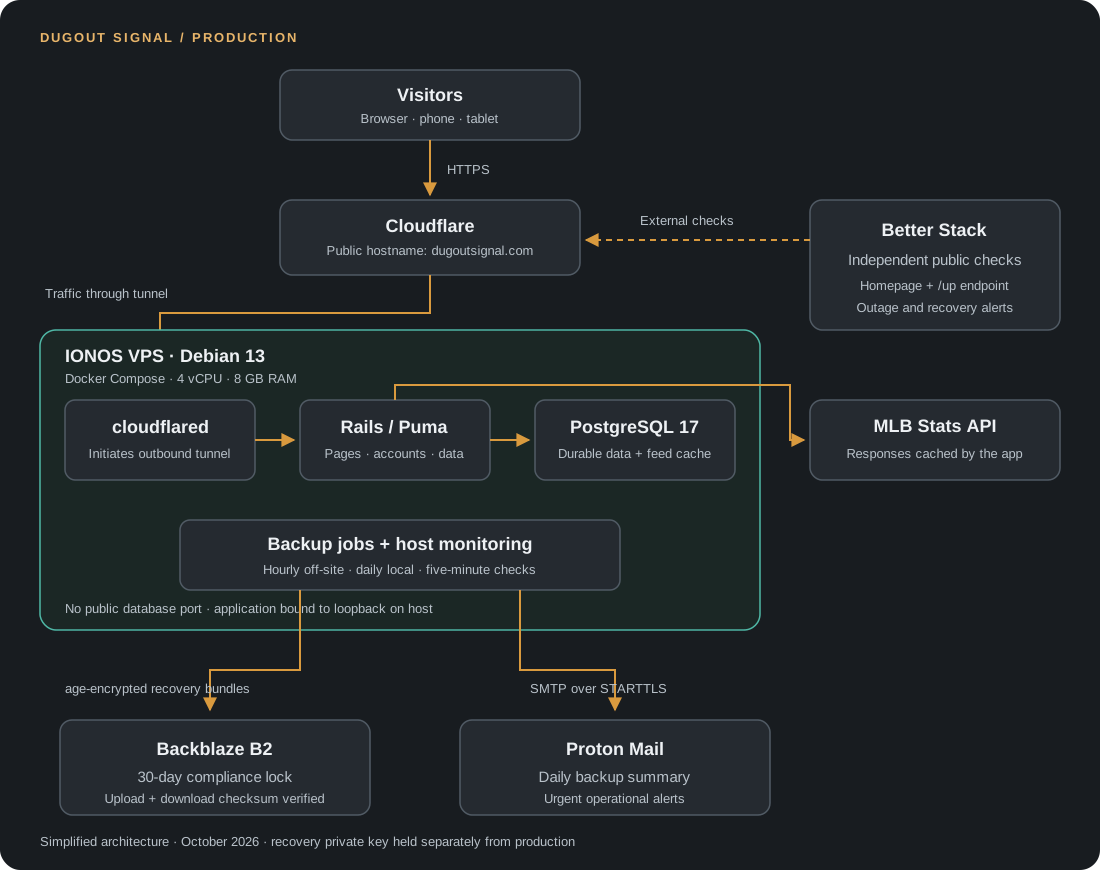
The production setup, from a browser request to the systems protecting the application. Click to enlarge.
The application port is bound to loopback on the host, PostgreSQL has no published host port, and the tunnel connector reaches the application through the Docker network. Public web traffic does not require an inbound application port on the VPS.
SSH uses keys, direct root SSH and password authentication are disabled, and the host firewall restricts inbound access. Automatic update settings and bounded Docker logs cover some of the less visible maintenance work.
Moving production without splitting the data
The migration needed more care than copying the application folder.
I stopped the old application before taking the final durable database dump, restored that data on IONOS, and compared table counts and content hashes. The original application secrets were preserved, including the secret needed to decrypt stored authenticator configuration.
Only after validation did I move the active tunnel connector. Running both connectors against separate, diverging databases would have created a much harder problem than a short maintenance window.
The old application’s containers were stopped, and its data was kept intact. That preserves a useful fallback, but it isn’t a license to switch back blindly: once users write new data on IONOS, any rollback needs to account for those changes.
There was also a very homelab-flavored troubleshooting detour. Intermittent SSH failures turned out to involve my home router’s intrusion prevention system identifying the repeated outbound connections as potential scanning. Correlating the server behavior with router logs led to a narrow exception for that signature and destination, rather than disabling the firewall.
Backups I can actually use
The backup design separates durable information from replaceable data.
Accounts, preferences, uploaded profile data stored in the database, and other application records need protection. Cached MLB responses can be fetched again. Excluding that cache data kept the recovery bundles much smaller while preserving the schema needed to rebuild it.
The current setup includes:
- Daily local PostgreSQL backups with archive checks and checksums.
- Hourly encrypted off-site bundles containing the application, durable database, and recovery configuration.
- Backblaze B2 objects protected by a 30-day compliance lock.
- A download-and-checksum comparison after each off-site upload.
- An additional verified backup copy on my Windows machine when it is available.
The server has the public encryption recipient. The private recovery identity is kept separately from the VPS. That separation means losing the production server doesn’t also have to mean losing the ability to recover it.
I tested downloading and decrypting an off-site bundle, verifying the original environment configuration, and restoring the database into a disposable database. That is meaningful verification, but it is not the same as rebuilding a complete replacement server. A full replacement-host rehearsal remains future work; a few hours is the recovery target, not a measured guarantee.
I initially enabled success emails for every backup. Hourly confirmations quickly became more noise than reassurance, so I changed that to one daily summary at 8:00 AM Arizona time. It reports successes, failures, gaps in recorded runs, and sizes in MB or GB. Urgent stale-backup alerts remain separate.
Better Stack now provides an outside view of the homepage and health endpoint. A monitor running only on the VPS can’t tell me anything if the entire machine goes offline. Backup heartbeats are available as a future addition, but aren’t connected yet.
What this project taught me
The most useful parts of this project were the decisions between the obvious milestones.
A feature can work correctly and still be confusing. A statistic can be accurate and still lack the context needed to interpret it. A successful backup upload doesn’t prove recovery. A server can have plenty of disk space while an unbounded cache quietly creates tomorrow’s maintenance problem.
Dugout Signal gave me a reason to work through those details together. It also gave me something I actually want to use, which makes it much easier to notice when a page is slow, an explanation is missing, or a design decision gets in the way.
There is more to build, but the next feature still has to answer the same question that started the project: does this make following baseball better?